Appointments Built for Global Scheduling

This was next in line of our major releases since 5.0 that will complete the WooCommerce Appointments to be the best in class very shortly. We are excited to released 5.2.x version which is all about confidence at scale. We focused on the three areas that matter a lot in appointment booking businesses: timezone accuracy, staff productivity, and faster admin booking workflows.
If your team works across cities or countries, 5.2.x removes guesswork and helps everyone see the right time, take the right action, and move faster. DST is very important and it now works on all levels, including recurring rules synced from the Google Calendar.
End-to-End Timezone Support That Just Works
Timezone handling in 5.2.x was fully refactored across the plugin. Customers, staff, and admins now see appointment times in their own timezone wherever they are, with DST-safe conversion tied to the exact appointment date.
- Always-on timezone support: Site-wide timezone handling is now consistent.
- Per-user timezone display: Customers, staff, and admins see times in their own context.
- DST-safe conversions: Wall-clock logic prevents off-by-one-hour issues during transitions.
- Timezone indicators: Admin list, calendar modal, checkout, and My Account all show clear context.
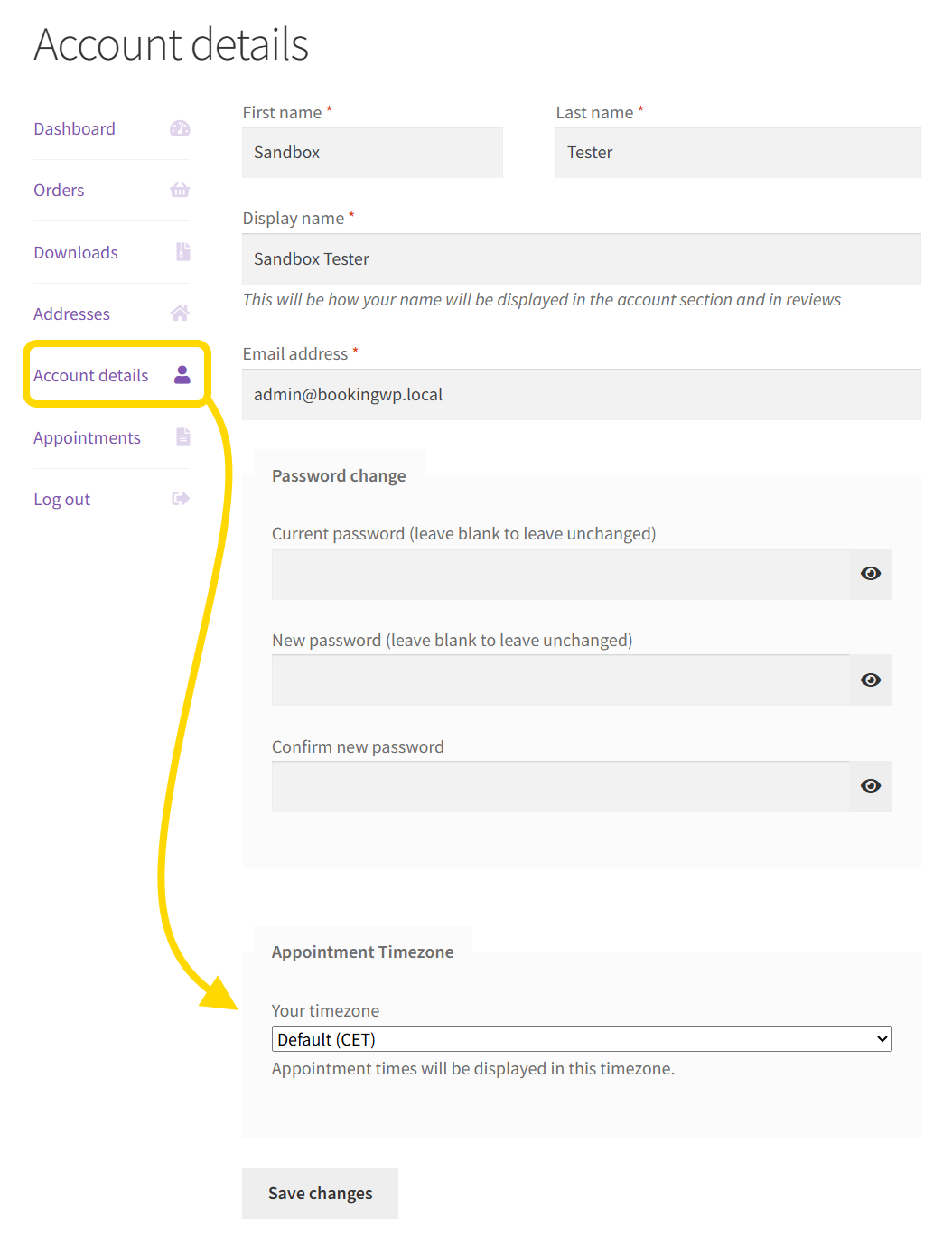
Smarter Email Delivery by Recipient Timezone
If admin and staff members all have different timezones, mails are now rendered using recipient-specific timezone context by grouping them to same timezone. That means admins, staff, and customers each receive appointment times in their own timezone when needed.
- Per-recipient timezone rendering for admin, staff, and customer emails.
- Correct timezone conversion in order summary emails.
- Email type classification fixes to prevent wrong timezone output.
Redesigned Staff Portal, Now Native in WordPress

Staff is very important and they need simple, but effective metrics to view their performance. This was not available before and staff did not have scheduling experience on this level before. Staff members now land directly on the native WordPress dashboard with a focused, appointments-first experience.
- 8 focused widgets: Overview, Trends, Upcoming, Insights, This Week, Monthly Schedule, Top Products, and Quick Actions.
- 3-column layout with automatic first-visit placement.
- Pending appointments alert as native WordPress admin notice.
- Cleaner workspace: non-essential default widgets removed for staff users.
Granular Permissions for Growing Teams

Admins now have better control over what staff can access and do, with improved control panel behavior and reliable live updates. Admins control what staff members can do or see on all levels, so there is no need for special WordPress capabilities checking any more.
- Staff can create appointments for any product only when permission allows.
- Staff dashboard navigation now follows native WordPress behavior.
- Control panel refresh functionality updates the dashboard in realtime.
Improved Admin Modal and Faster Calendar Workflow
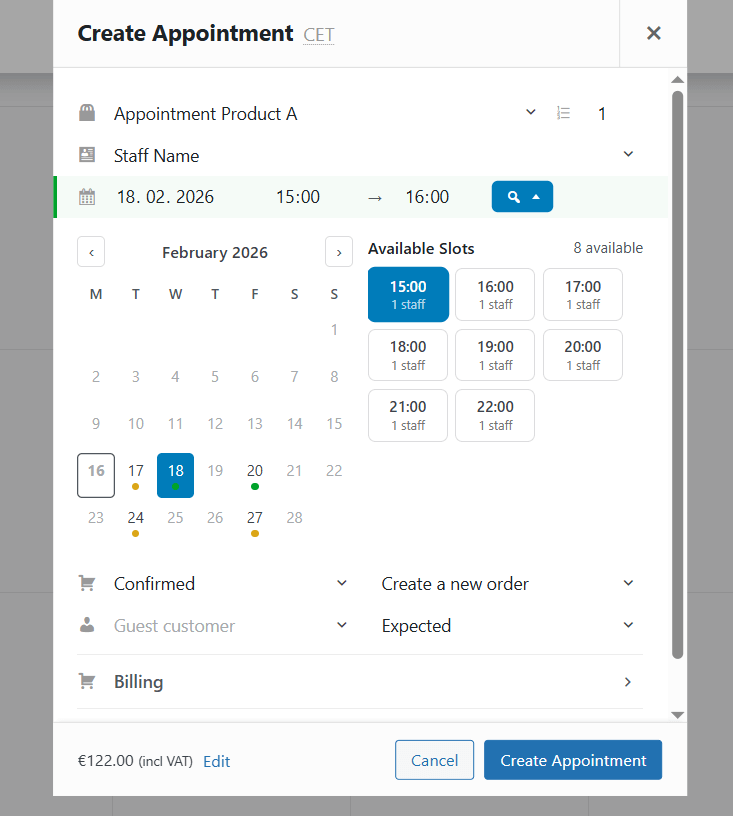
The admin booking flow is now faster and safer. Appointment creation in the modal includes stronger validation and better guidance before submission. There is no guessing any more as slots and date picker show available time the same way customer does.
- Visual Availability validation before creating appointments.
- Month picker for faster date navigation.
- Visible available time slots directly in the modal.
- Readability polish across key admin UI elements.
Multi-select Filtering in admin calendar

Filtering by appointments Status, Product or Staff is now vastly improved and you can multi-select what you want to see and it updated in real-time. Filtering is much simpler and faster now so you can instantly filter out appointments you’re interested in.
Ready to Upgrade?
Update to WooCommerce Appointments 5.2.x from your WordPress dashboard or Plugins screen, then open your calendar and log in as staff to experience the all-new portal and the changes immediately.
If your business schedules across timezones or coordinates distributed staff, this is a high-impact update you’ll feel right away and will definitely make everybody feel at home in their timezone.
Happy booking! 🎉
Leave a Reply