Most appointment businesses do not live on one-off bookings. Yoga studios sell eight-week blocks. Clinics book 12-visit rehab plans. Salons run monthly memberships. This is fully supported with our Appointments plugin and much more.
Summary of what is now available:
- Class Packs
- Pay-first Plans
- Membership Credits
- New Admin Calendar
Two Ways to Sell Repeat Business
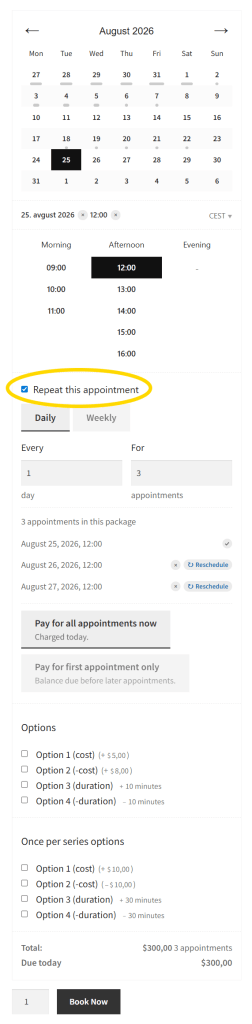
Class packs are for fixed programs: eight weekly classes, a term of tutoring, a treatment plan. The customer ticks Repeat this appointment, sees every session, and checks out once. They can pay in full or pay for the first session only. You can limit minimum and maximum sessions required, and customers can reschedule and cancel during the booking process or after.
Monthly memberships are for ongoing access until cancellation: four visits per month, credits that refill each billing cycle. You need WooCommerce Subscriptions. Members book one slot at a time and spend a credit at checkout.
You can of course offer both; use one appointable product for packs and one subscription product for the membership. Both can work together and cover your full repeat business model however you like.
Class Packs
Turn on Can be recurring? on any appointable product. Your customer picks a time, chooses daily, weekly, or monthly repeat (if you configure it that way), sets how many sessions they want, and sees every date before they add to cart. If one slot is taken, they can pick a nearby time instead of losing the whole package.
Setup fees and add-ons can be charged once for the whole pack, or for each appointment separately. Add-ons here can enhance your business model and the up-sells you want to offer.
Pay-First Plans
Not everyone will prepay eight sessions on day one. With pay-first, they pay for the first appointment today. The rest goes on a balance they can settle later from their account, an email link, or your team sending a payment request. You can also record cash or offline payments later; enable the payment methods you accept in WooCommerce for the best experience.
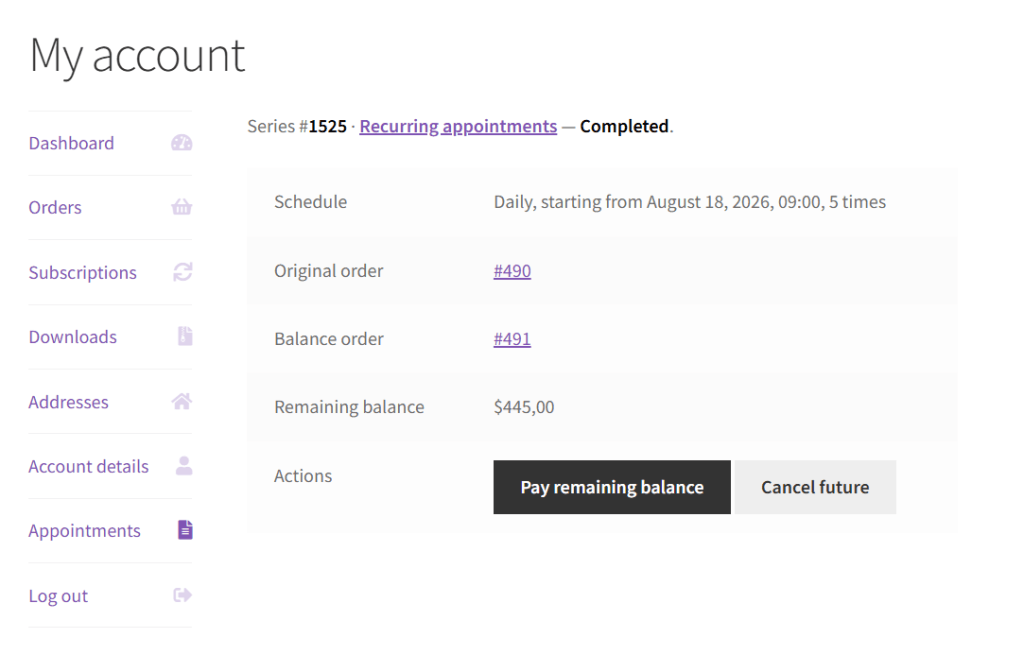
Customers see Pay remaining balance in My Account. They also receive balance reminders in email notifications. Your team manages balances from the order screen like any other WooCommerce order. You can send payment requests and stay in control of the rest of the package.
Credits / WooCommerce Subscriptions
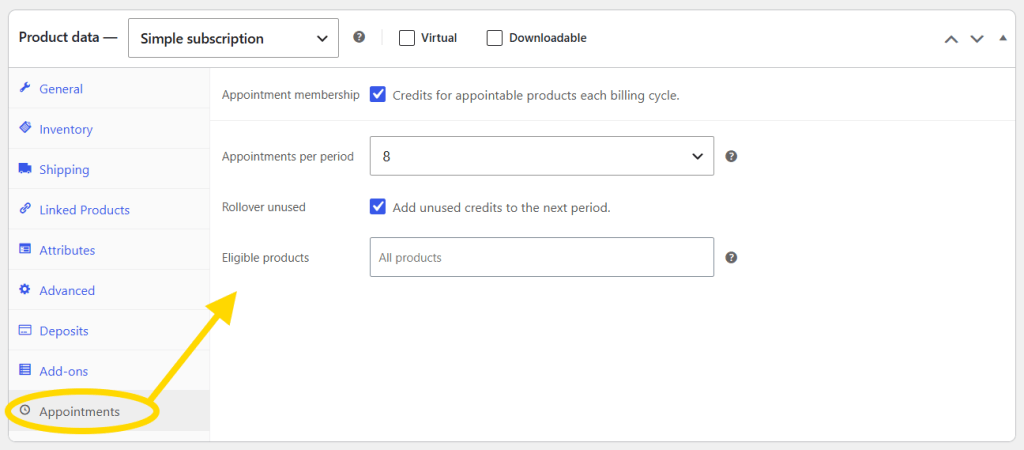
Create a subscription product, open the Appointments tab, and set how many credits members get each billing period. Unused credits can roll over. You choose which products and services they apply to. Credits are applied automatically at booking; members book until their balance runs out.
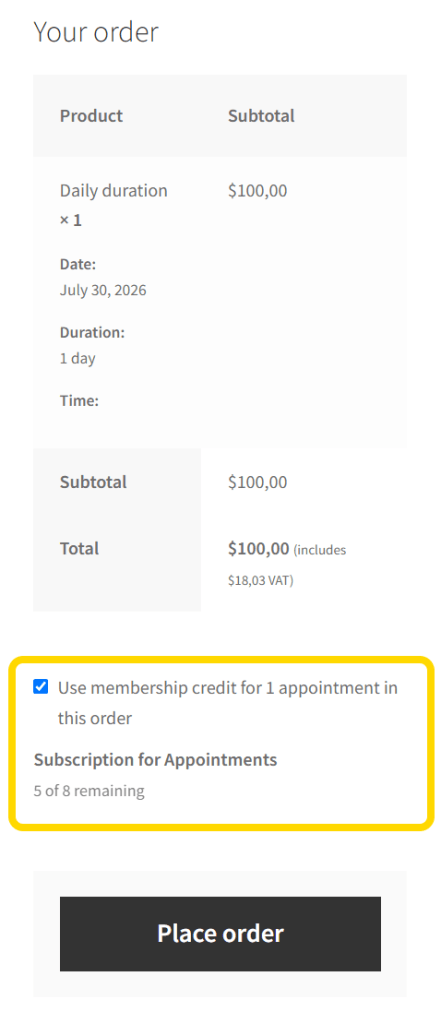
When a member books, Use membership credit is offered on the form and is checked by default when one plan applies. They can uncheck it if they prefer to pay normally. Covered visits are not charged at checkout.
Customers Manage Their Own Series
After purchase, customers open My Account → Appointments to see every session, pay a balance, reschedule one week, or cancel what is left. When they change something, they choose “just this visit”, “this and all following visits”, or “the whole series”. The same choices your team has in the admin calendar. If they need a new time, the plugin suggests the nearest open slots.
Admin Calendar for Busy Days
Your team gets a faster calendar built for recurring work and managing all other appointments. The admin calendar shows month, week, and day views. Recurring series are marked with ↻ so they stand out. Filter to series only when you need to. Click any slot to create or edit, the panel opens right beside the appointment you are working on, not lost in a separate screen.
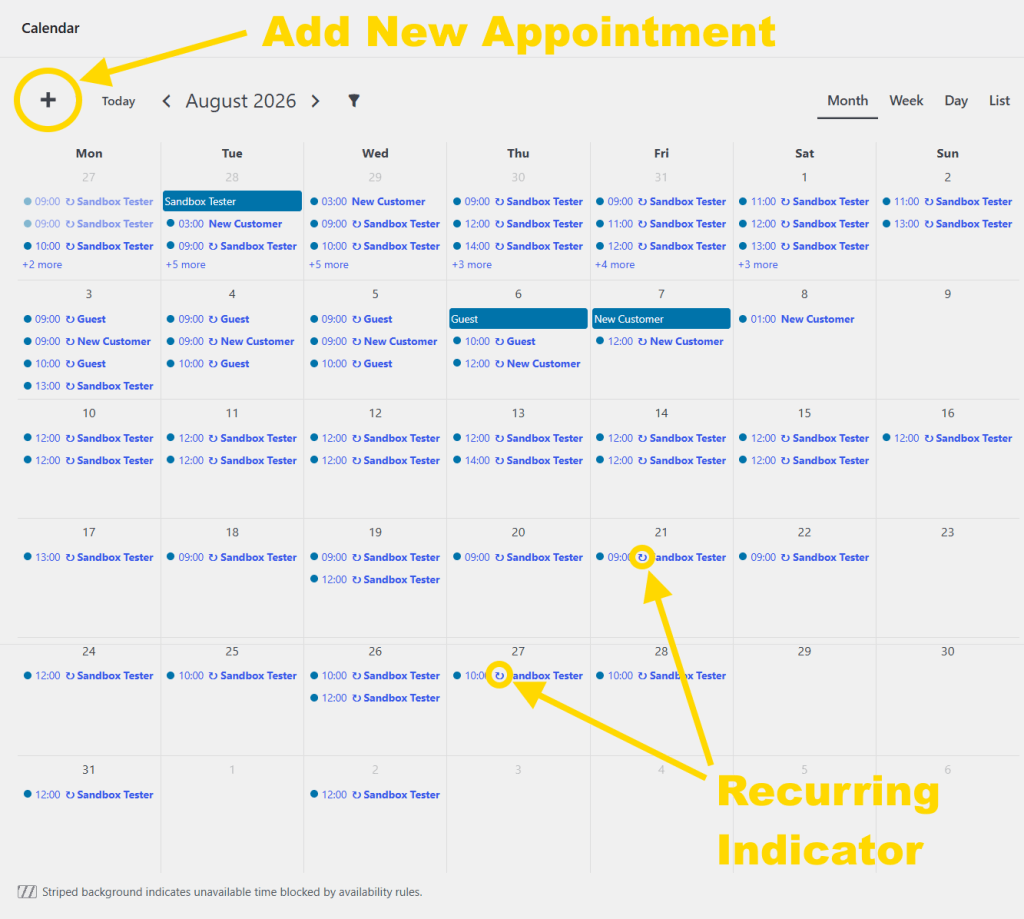
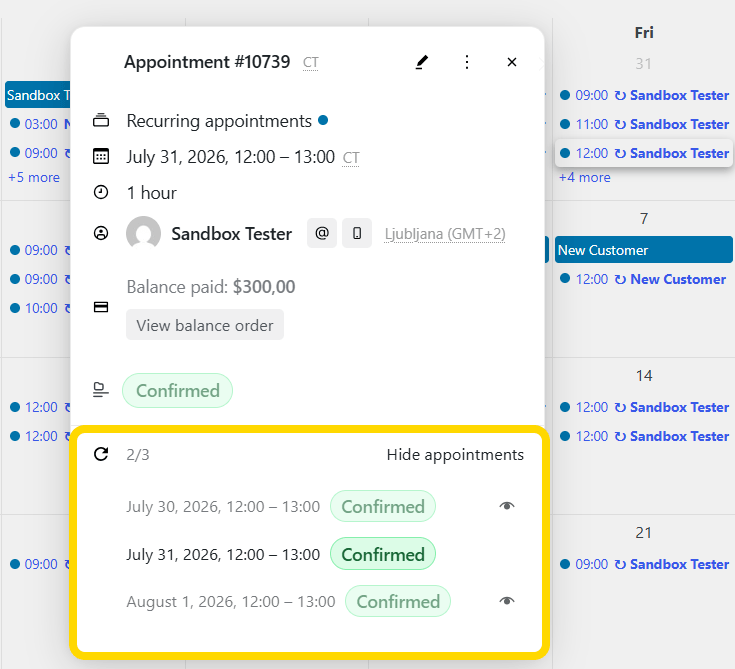
When someone books on the storefront, the calendar updates live. Recent improvements include a cleaner month grid, quicker loading when you switch views, and a cleaner, faster overall admin calendar experience.
From the panel you can expand every session in a pack, change status with Apply to, and move between appointments in a series with a clear view of the whole package.
Common Questions
Can Appointments handle recurring bookings?
Yes. Customers book a full series daily, weekly, monthly, and so on, all in one simple checkout flow.
Do I need WooCommerce Subscriptions?
Only for monthly membership credits. Class packs and pay-first plans work without it.
The difference between a pack and a membership?
A pack is “buy 8 sessions now.” A membership is “pay every month and get X visits each cycle until cancellation.”
What does pay-first mean?
The customer pays for the first appointment today. The rest is due later with a Pay remaining balance link, or you can mark it paid offline (for example cash).
Can someone skip just one week?
Yes. They and you can change a single session without breaking the whole series.
Get Started
Update Appointments from your WordPress dashboard to 5.4.0 or newer.
- Class pack → edit an appointable product → turn on Can be recurring?
- Membership → create a subscription product → open the Appointments tab
- Test it → book a series on the storefront, then check My Account → Appointments
Guides: Recurring packages · Membership credits
Leave a Reply